by Zelkulon10 March 20251 min read
Liquibase makes database migrations reproducible, versioned and safe. This guide shows the complete workflow from the first migration to rollback.
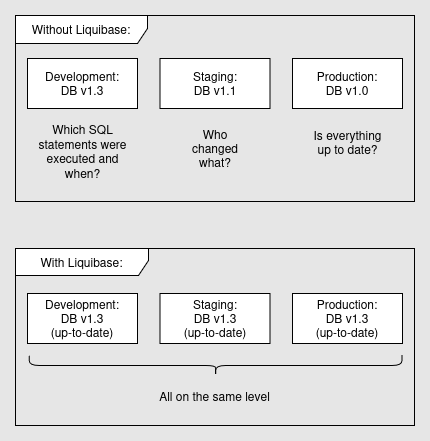
The Problem Without Liquibase
Changelog Structure
src/main/resources/db/changelog/
├── db.changelog-master.yaml     ← Master (imports all others)
├── 2024/
│   ├── 001-create-users-table.yaml
│   ├── 002-add-email-index.yaml
│   └── 003-create-orders-table.yaml
└── 2025/
    ├── 001-add-last-login-column.yaml
    └── 002-create-audit-log.yaml
# db.changelog-master.yaml
databaseChangeLog:
- includeAll:
path: db/changelog/2024/
- includeAll:
path: db/changelog/2025/Changeset: Creating a Table
# 2024/001-create-users-table.yaml
databaseChangeLog:
  - changeSet:
      id: 2024-001-create-users
      author: [email protected]
      changes:
        - createTable:
            tableName: users
            columns:
              - column:
                  name: id
                  type: VARCHAR(36)
                  constraints:
                    primaryKey: true
                    nullable: false
              - column:
                  name: email
                  type: VARCHAR(255)
                  constraints:
                    nullable: false
                    unique: true
              - column:
                  name: created_at
                  type: TIMESTAMP
                  defaultValueComputed: CURRENT_TIMESTAMP
      rollback:
        - dropTable:
            tableName: users
Complex Migration with Context
# 2025/001-add-last-login.yaml
databaseChangeLog:
  - changeSet:
      id: 2025-001-add-last-login
      author: [email protected]
      preConditions:
        onFail: MARK_RAN
        tableExists:
          tableName: users
      changes:
        - addColumn:
            tableName: users
            columns:
              - column:
                  name: last_login_at
                  type: TIMESTAMP

  # Run in test/dev only
  - changeSet:
      id: 2025-002-insert-test-data
      context: "test,development"
      changes:
        - insert:
            tableName: users
            columns:
              - column: { name: email, value: "[email protected]" }
Rollback
# Via Maven Plugin
mvn liquibase:rollback -Dliquibase.rollbackCount=1

# Via CLI
liquibase rollback --tag=v1.0
liquibase rollbackCount 3
Best Practices
- Changesets are immutable – never modify already-executed ones
- Always define rollback instructions
- Use contexts for environment-specific migrations (test, development)
- Numeric prefix (001-, 002-) for ordered execution
- In CI/CD: run mvn liquibase:validate before every deployment
Summary
- Reproducible: Every environment is guaranteed to be at the same state
- Versioned: Complete history of all schema changes
- Rollback-capable: Migrations can be undone
- CI/CD-ready: Automatic execution on every deployment